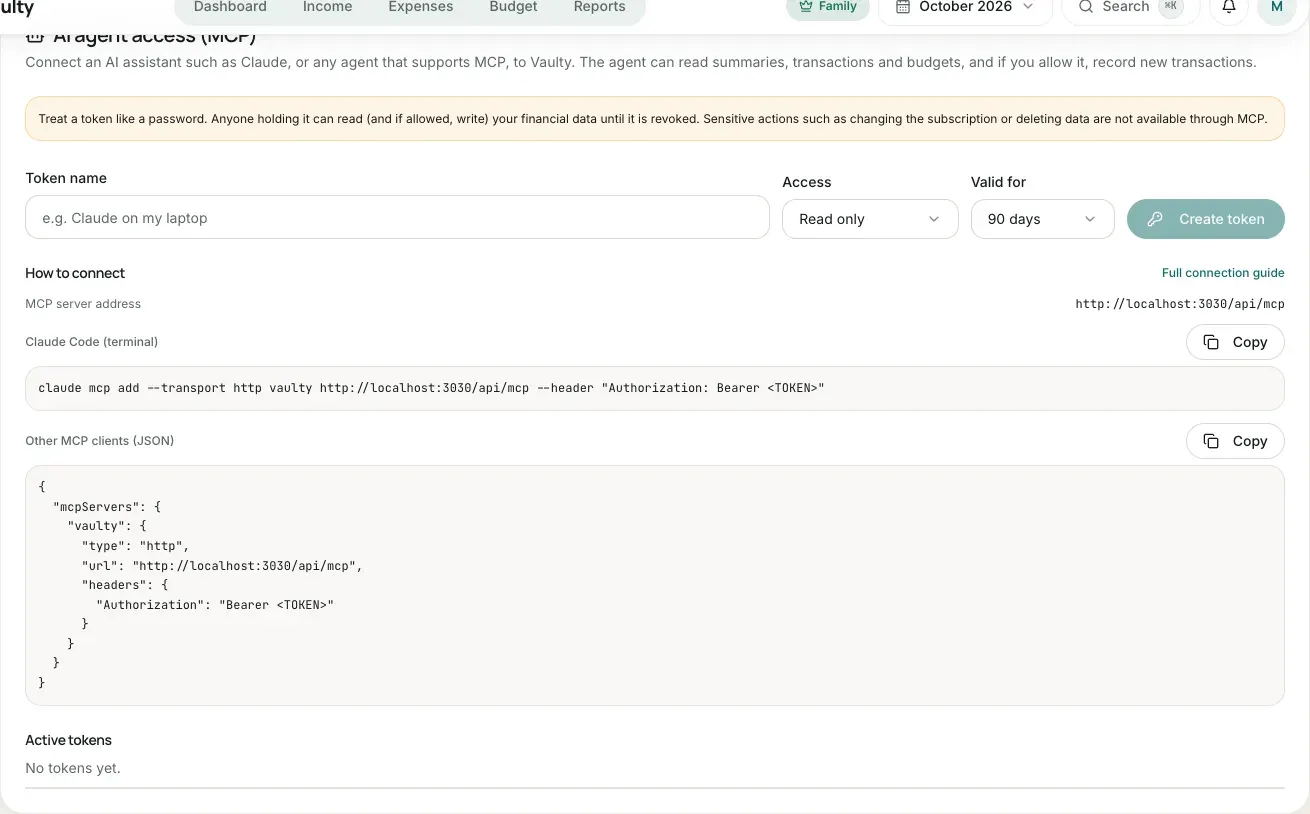
Connecting an AI agent (MCP)
MCP (Model Context Protocol) is a standard way for AI assistants to connect to other services. With MCP, the assistant you use (for example Claude Code) can read your finances (summaries, cash flow, budgets, savings, bills, debts, health score, and more) and, if you allow it, record new transactions in Vaulty.
Available on the Personal plan and above.
1. Create an access token
Section titled “1. Create an access token”- Open Settings > AI agent access (MCP). Only the organization owner can manage tokens.
- Enter a token name (for example “Claude on my laptop”).
- Choose the access: Read only, or Read and edit data.
- Choose the validity: 30 days, 90 days, 1 year, or no expiry.
- Click Create token, then copy the token now. It is shown only once.
2. Connect it to your agent
Section titled “2. Connect it to your agent”MCP server address: https://<your-vaulty-app-address>/api/mcp. The settings page shows the correct address with ready-to-copy examples.
Claude Code
Section titled “Claude Code”claude mcp add --transport http vaulty https://<your-vaulty-app-address>/api/mcp \ --header "Authorization: Bearer <TOKEN>"Other MCP clients (JSON)
Section titled “Other MCP clients (JSON)”{ "mcpServers": { "vaulty": { "type": "http", "url": "https://<your-vaulty-app-address>/api/mcp", "headers": { "Authorization": "Bearer <TOKEN>" } } }}3. Try it
Section titled “3. Try it”Ask your agent, for example:
- “What is my total spending this month, and which category is the largest?”
- “Which budgets have I gone over?”
- “Record a coffee expense of Rp 25,000 in the Food category.”
- “What is my financial health score this month, and what should I improve?”
- “Which bills are still unpaid this month? Mark the electricity bill as paid.”
- “How far along is my vacation goal, and how much should I deposit each month?”
- “Record a Rp 500,000 installment on my debt to Budi.”
Requests that record or change data need a token with write access. The agent will first fetch the category list so the category and payment method match.
Limits and security
Section titled “Limits and security”- The agent can read and, with a write token, add and change data in every feature your plan includes. What it cannot do through MCP: change the subscription or payments, invite or remove members, change the recording currency, restore backups, and upload receipt attachments.
- Deleting always needs explicit confirmation (
confirm: true), and the data goes to the trash for 30 days. Restoring is done from the Trash menu in the app. - All amounts use your organization’s recording currency, not always rupiah.
- At most 60 requests per minute per token and 10 active tokens per organization.
- Every call is checked again: the token is not revoked or expired, its creator is still a member of the organization, and the plan still includes MCP.
- Everything recorded through MCP is written to the activity log with the token name.
- Downgrading to Free closes MCP access. Tokens are not deleted and work again when you upgrade.
See the tools reference for each tool’s parameters.
What it looks like in the app
Section titled “What it looks like in the app”